Cheap Storage
I was on AliExpress and came across this item for sale:
Description: "1TB External Hard Drive 2TB Portable SSD High Speed Hard Disk USB-C Original Storage Device for Laptop/PC/Phone/Mac" Color options: 1T, 30T, 64T, 16T, 6T, 128T, 8T, 2T, and 4T
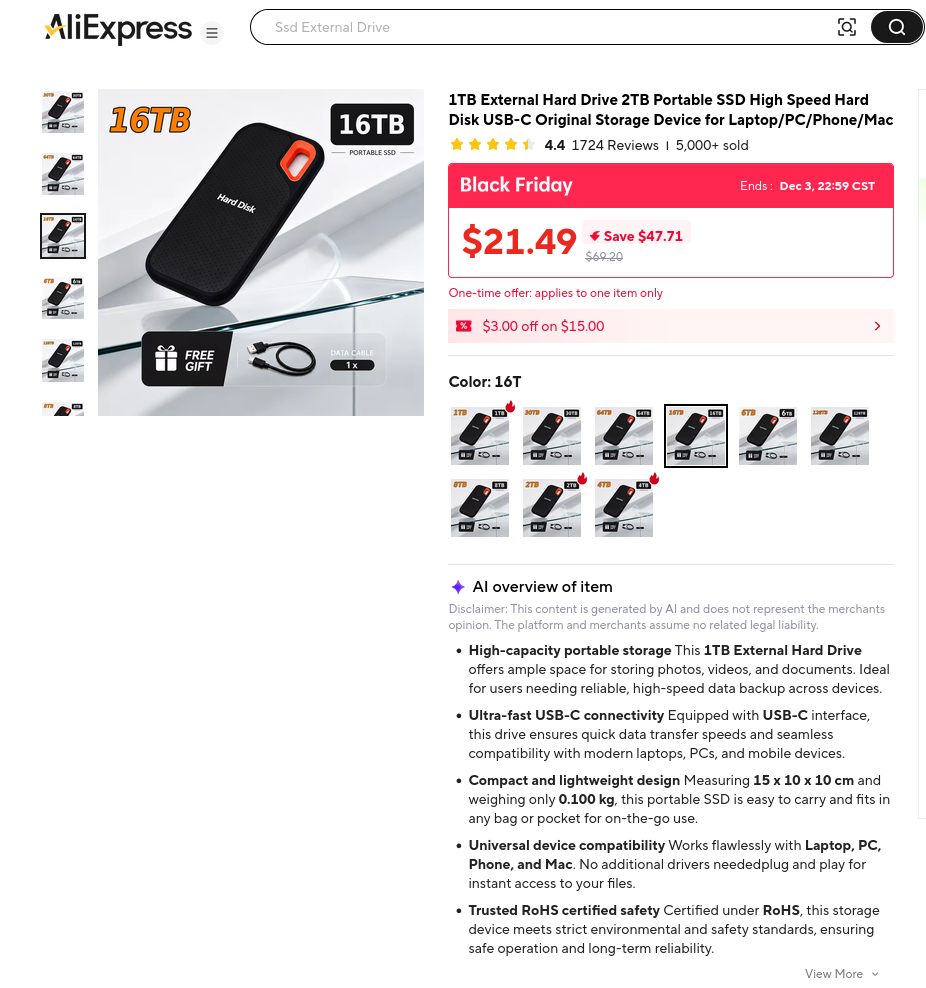
In case you aren't aware, sellers on AliExpress commonly use the "Color" selector to let you choose a specific sub-category, in this case the (apparennt) size of the SSD.
Being we are in the middle of "RAMageddon" right now - which is impacting all things PC electronics - I decided I'd take the chance, knowing that the $21 was going to be a lost cause.
Shipping
It was my first puchase through AliExpress so I didn't know what to expect. Being a long-time consumer of goods sold on-line through EBay, Amazon, NewEgg, and Googlegear (remeber them?), I didn't expect two-day shipping (it wasn't), but I didn't think it would be multiple weeks (it wasn't either).
I placed the order on November 11, and AliExpress kept me up-to-date with all of it's phases:
- November 11 - Order confirmed
- November 12 - Order shipped
- November 12 - Received by sorting center
- November 13 - Update from departure country
- November 13 - Left departure region
- November 17 - In your country/region
- November 20 - Has been delivered
So, well less than the "slow boat" method that I was partially expecting.
And let's not forget - back in the "last century", buying anything usually meant thumbing through a big catalog, calling or stopping by the local branch to place the order, then waiting for an update. If you were lucky, when you placed the order they would estimate the arrival at 4-6 weeks. And if you got an update sooner than that, it was rarely good news - usually there had been some delay so add on another couple weeks to take delivert.
But I did receive it and heres it is.
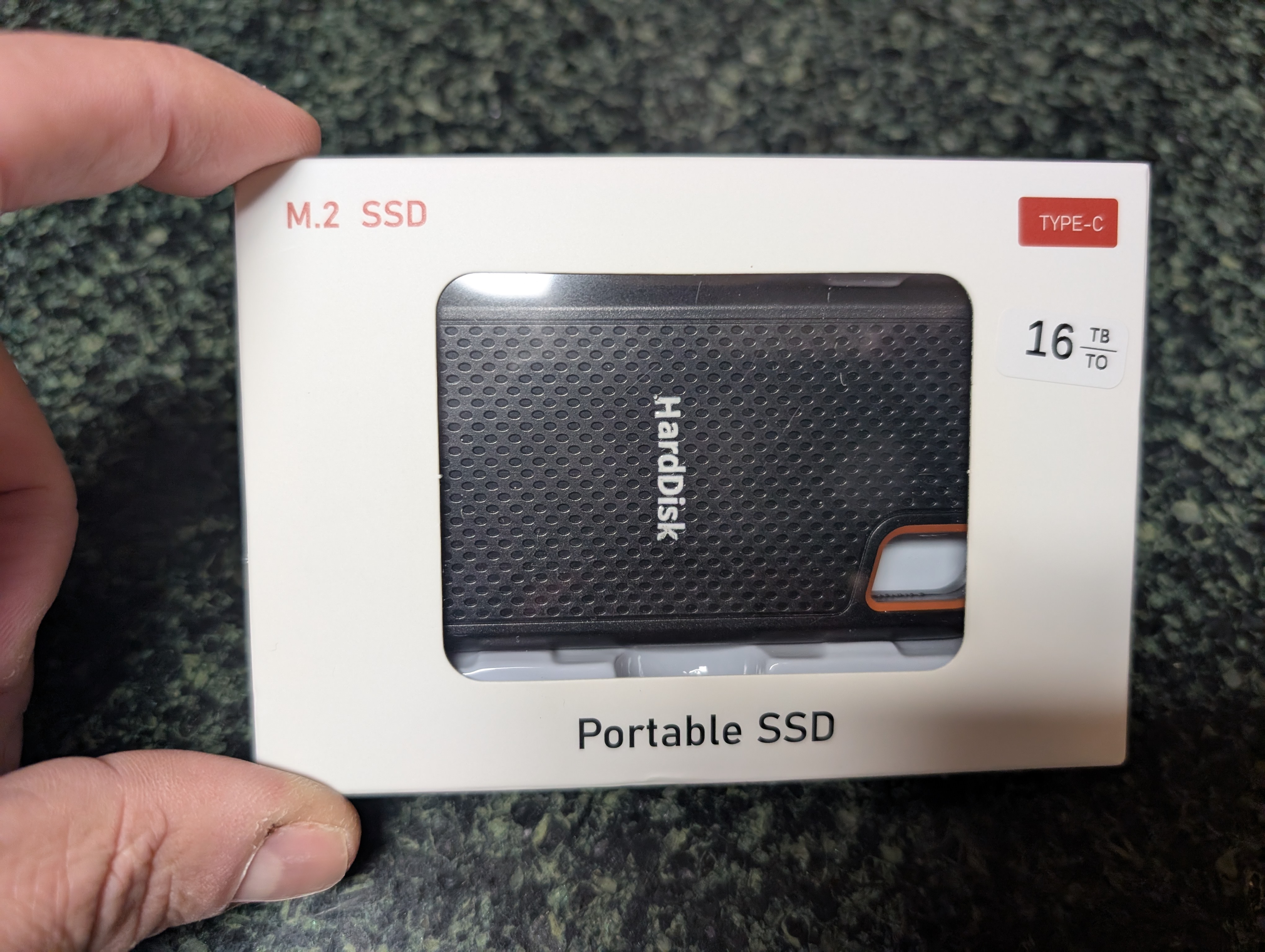
The physical size is about what I was expecting. Now to see what I got.
Unboxing
Not a lot to see inside the box.
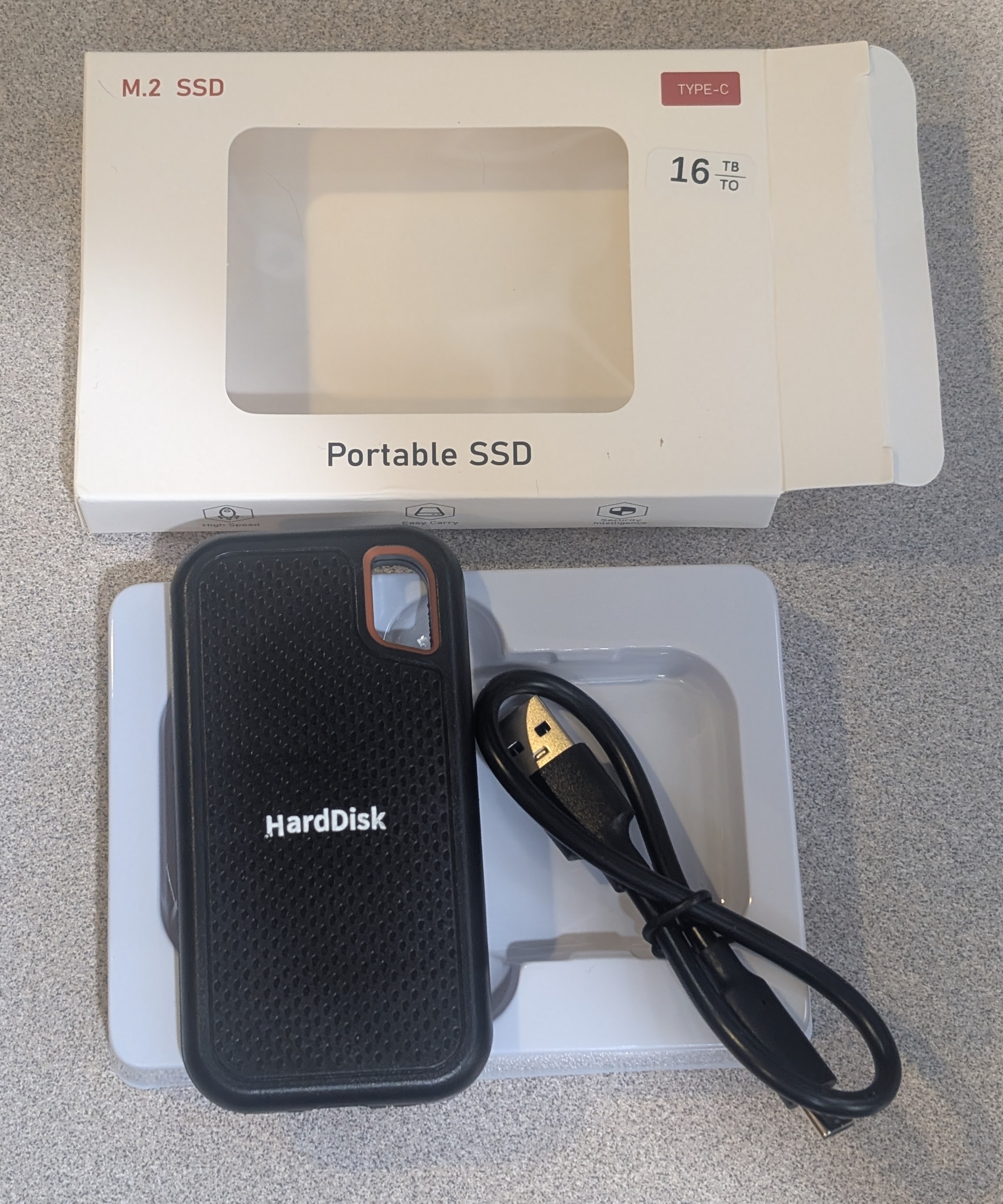
The SSD case is about 100mm (long) x 50mm (wide) x 10mm (thick) (or 4" x 2" x 3/8"), and very light. The small mounting loop/hole is about 15-20mm x 10mm, and centered on the opposite end is the USB-C port.
The USB cable is a 320mm (12.5") cable of average but decent feeling quality - decent cable diameter, decently flexible, etc.
Aside from the "HardDisk" label printed on the front, there are no other markings on it, not even capacity.
It feels ok, and if it does work, the plastic case feels solid enough that I wouldn't feel concerned about carring it in a jeans pocket.
Plugging it in
Not knowing what could be on this, or if it will damage my computer I took two precautions.
-
I setup a virtual machine and setup my system so the USB device would be passed through to it, not to my primary OS.
-
I plugged it into an external USB hub, not directly into my motherboard.
The first precaution ensures that if there's a Windows virus pre-installed on it, only my virtual machine should be compromised. The second precaution protects my computers motherboard from mis-wired electronics that could fry a USB port. I'll buy a new USB hub for $15 so I don't have to replace my motherboard (See the previously mentioned "RAMageddon" for the replacement cots concerns).
Initial information
The device is recognized as an "Integrated Technology Express, Inc. Chipsbank CBM2199 Flash Drive".
The system sees this when it was plugged in:
[402603.019568] usb 1-3.1.2.1: new high-speed USB device number 15 using xhci_hcd
[402603.110338] usb 1-3.1.2.1: New USB device found, idVendor=048d, idProduct=1234, bcdDevice= 1.00
[402603.112473] usb 1-3.1.2.1: New USB device strings: Mfr=1, Product=2, SerialNumber=3
[402603.112481] usb 1-3.1.2.1: Product: SSD
[402603.112485] usb 1-3.1.2.1: Manufacturer: SSD
[402603.112487] usb 1-3.1.2.1: SerialNumber:
[402603.113259] usb-storage 1-3.1.2.1:1.0: USB Mass Storage device detected
[402603.113550] scsi host1: usb-storage 1-3.1.2.1:1.0
[402604.173890] scsi 1:0:0:0: Direct-Access     SSD      SSD              5.00 PQ: 0 ANSI: 2
[402604.174534] sd 1:0:0:0: Attached scsi generic sg1 type 0
[402604.174805] sd 1:0:0:0: [sdb] Very big device. Trying to use READ CAPACITY(16).
[402604.175623] sd 1:0:0:0: [sdb] 4096000000 4096-byte logical blocks: (16.8 TB/15.3 TiB)
[402604.175774] sd 1:0:0:0: [sdb] Write Protect is off
[402604.175780] sd 1:0:0:0: [sdb] Mode Sense: 0b 00 00 08
[402604.175929] sd 1:0:0:0: [sdb] No Caching mode page found
[402604.175934] sd 1:0:0:0: [sdb] Assuming drive cache: write through
[402604.188876] sd 1:0:0:0: [sdb] Very big device. Trying to use READ CAPACITY(16).
[402604.212097] sd 1:0:0:0: [sdb] Attached SCSI removable disk
[402604.248104] sd 1:0:0:0: [sdb] tag#0 FAILED Result: hostbyte=DID_OK driverbyte=DRIVER_OK cmd_age=0s
[402604.248111] sd 1:0:0:0: [sdb] tag#0 Sense Key : Illegal Request [current]
[402604.248115] sd 1:0:0:0: [sdb] tag#0 Add. Sense: Logical block address out of range
[402604.248119] sd 1:0:0:0: [sdb] tag#0 CDB: Read(10) 28 00 f4 23 ff f0 00 00 01 00
[402604.248121] critical target error, dev sdb, sector 32767999872 op 0x0:(READ) flags 0x880700 phys_seg 1 prio class 2
[402604.248552] sd 1:0:0:0: [sdb] tag#0 FAILED Result: hostbyte=DID_OK driverbyte=DRIVER_OK cmd_age=0s
[402604.248558] sd 1:0:0:0: [sdb] tag#0 Sense Key : Illegal Request [current]
[402604.248562] sd 1:0:0:0: [sdb] tag#0 Add. Sense: Logical block address out of range
[402604.248567] sd 1:0:0:0: [sdb] tag#0 CDB: Read(10) 28 00 f4 23 ff f0 00 00 01 00
[402604.248570] critical target error, dev sdb, sector 32767999872 op 0x0:(READ) flags 0x800000 phys_seg 1 prio class 2
[402604.248576] Buffer I/O error on dev sdb, logical block 4095999984, async page read
And the Linux lsblk says it's reporting as a 16TB drive:
# lsblk /dev/sdb
NAME MAJ:MIN RM  SIZE RO TYPE MOUNTPOINTS
sdb    8:16   1 15.3T  0 disk
What the OS sees
After assigning that USB drive to my fully Windows VM, the Windows OS is seeing it as a 16TB (15.2TB usable) drive:
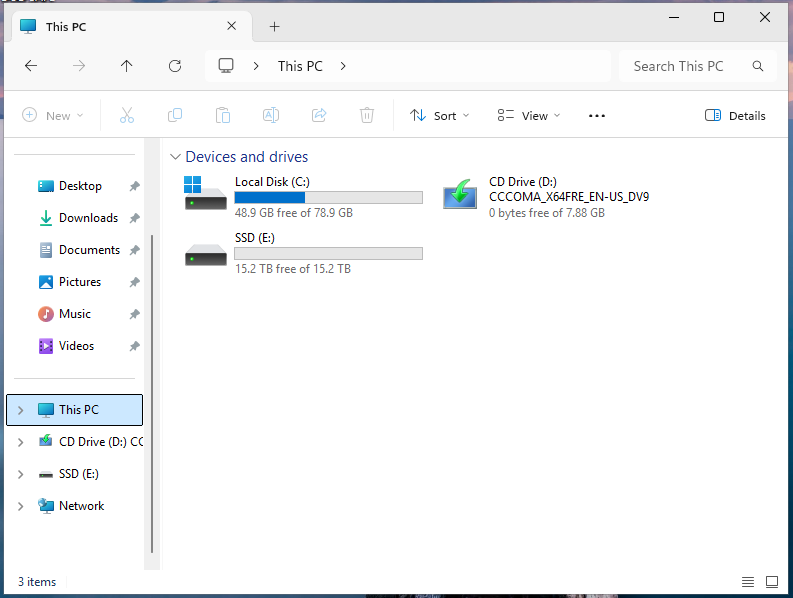
And sure enough, going into that drive works, and Windows doesn't see anything pre-loaded. No "MakeMyPCFaster.exe" or "FreeGamesOnline.exe" tools. Kind of refreshing.
What's really available
Many of the fake drives sold online will spoof the OS into thinking it's a 16TB drive, but actually only having a small bit of real storae. When you copy anything to it, the drive will tell the OS that the copy succeeded and you're none-the-wiser. On the back end, it wrote enough to the drive that your filename with the proper information appears but the actual data isn't written and stored to the disk.
Mr. Steve Gibson, the owner of GRC.Com, wrote a handy tool called ValiDrive. What it does is writes known information to many locations on the drive, then reads back that information. If what it wrote and what it read are ok, then you can be pretty confident the drive is legit. But if it reads back incorrectly, you've got a bad drive of some sort.
I've downloaded it and ran it within my VM. It warned me about "Controlled Folder Access", so I re-ran the utility. The second time it confirmed the drive I want to scan:
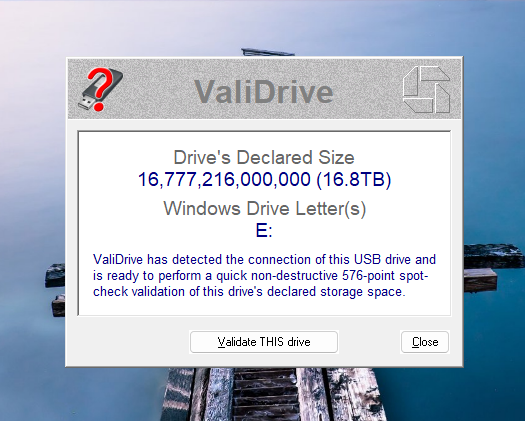
So I clicked the "Validate THIS drive" and it started.
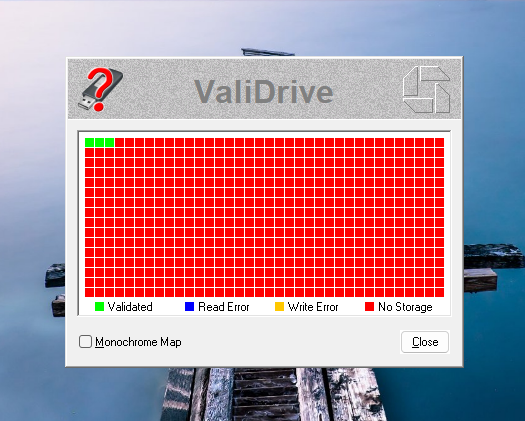
Hmm, all that red is not good... And the report ValiDrive produces confirms this as well:
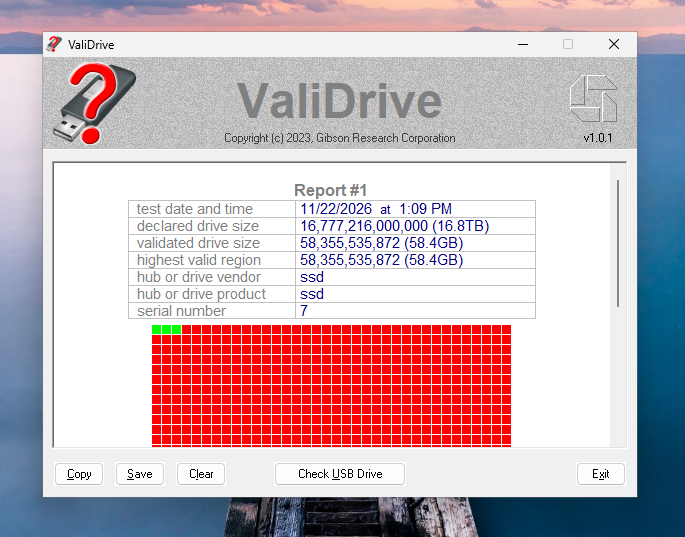
So, in spite of the "16TB" claim, this appears to be a 64GB SSD inside the case.
Well, we're not out anything so we'll open it up and see what's inside the plastic.